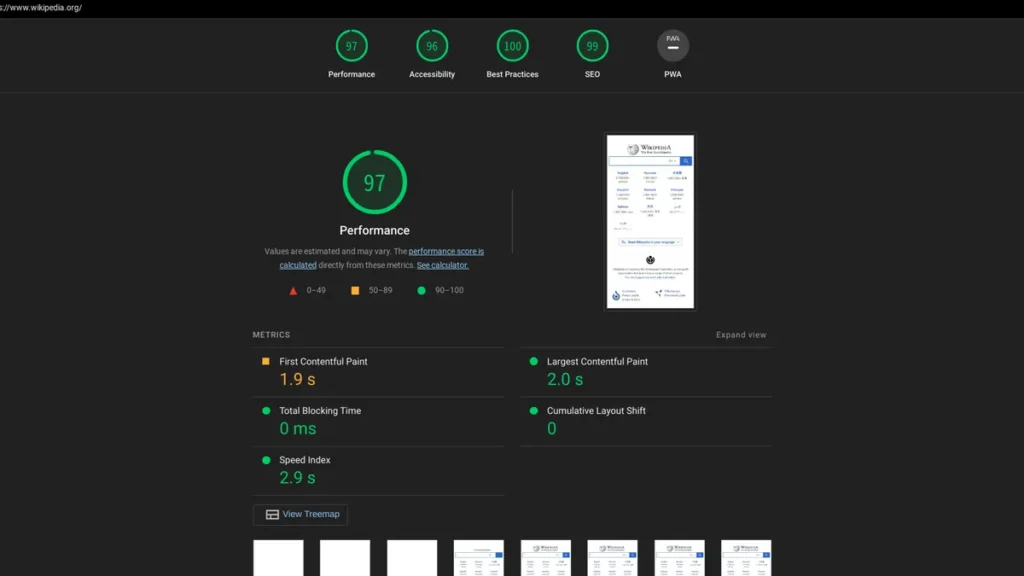
Core Web Vitals are useful because they summarize important parts of the user experience, but they become distracting when a site owner treats a perfect synthetic score as the goal. A good audit connects metrics to actual page behavior.
Quick Answer
Use field data when available, identify which templates and page elements drive poor LCP, INP or CLS, and fix the largest user-facing causes first. Lab tools help diagnose issues; they do not replace real-user measurements.

Know What the Three Metrics Represent
Largest Contentful Paint reflects loading of the main visible content. Interaction to Next Paint measures responsiveness to user interactions. Cumulative Layout Shift captures unexpected visual movement.
A metric is useful when it points you toward a real experience problem, not when it becomes a number to optimize in isolation.
Separate Field and Lab Data
Search Console and Chrome UX data summarize real-user experience where enough data exists. Lighthouse and other lab tools run controlled tests that are excellent for diagnosis but may not match every visitor.
Use both, but label which type of evidence you are discussing.
Fix the Largest Causes First
Oversized hero images, render-blocking assets, heavy third-party scripts, unstable ad slots and long JavaScript tasks often explain poor measurements. Focus on repeatable template-level improvements rather than one-off score tricks.

Core Web Vitals Audit
- Review field data by URL group.
- Run lab tests on representative templates.
- Identify the LCP element.
- Test interaction responsiveness and long tasks.
- Look for images, ads or embeds causing layout shifts.
- Recheck after deployment with the same evidence type.
Example: A Page With a Great Lab Score but Weak Field Data
A homepage may score well in a controlled Lighthouse run on a fast test connection but still perform poorly for real visitors because of third-party scripts, geographic latency, logged-in states, ads, or device differences. That is why field data and lab diagnostics answer different questions.
Use field data to identify whether real users are experiencing a problem and which URL groups are affected. Then use lab tools to reproduce the page and investigate likely causes. A lab test is excellent for finding a render-blocking asset or an unstable element; it is not a substitute for real-user evidence.
Map Each Metric to a Visible Cause
For LCP, identify the actual largest element and ask why it arrives late. For INP, inspect long tasks, heavy scripts, and event handlers around real interactions. For CLS, watch which element moves and whether images, ads, embeds, fonts, or injected banners are changing layout after the initial render.
This keeps optimization grounded. Instead of “improve CLS by 0.05,” the engineering task becomes “reserve height for the ad slot that pushes the article down after load.” That is easier to test, explain, and maintain.
Common Mistakes
Do not remove useful content just to improve a lab score, assume every 100/100 test means real users are fast, or treat Core Web Vitals as the only part of page experience.
Watch the Topic in Context
Deciphering INP and Core Web Vitals
Google Search Central discusses LCP, CLS, INP and why user experience matters more than chasing isolated metric scores.
Watch on YouTube ↗ · Google Search Central